Index / Selected Work / Prime Video Redesign
[ Case Study · 05 / 06 ]

A more personal
way to stream.

A redesign of the Prime Video platform that shifts focus to the individual user — connecting their viewing choices with their social groups. Design decisions driven through working sessions with an Amazon UX lead.

primevideo.com — redesign
Prime Video redesign hero [ FIG.01 ] PRIME VIDEO · REDESIGN UC BERKELEY EXT · 2020 4 WEEKS · 5 DESIGNERS
Role Lead UX Research · Prototyping · Testing
Duration 4 weeks · 2020
Team Adriana Deepa Hattie Sonja Lydia
Skills PM · UX Research · Competitor analysis · Wireframes · Hi-fi mocks · Prototyping
01 · The Challenge

Prime Video felt generic.

We surveyed 100 users across streaming services. 70% preferred a competitor; only 30% chose Prime Video. Our goal: identify the key pain points and redesign the interface to remove the friction.

What emerged was that users felt the Prime Video portal was a generic, nondescript account. There was no way to share movies and shows with friends — and no real interaction between the people watching alongside each other.

01
70%
of surveyed users preferred a competitor over Prime Video
Survey · 100 users
02
30%
chose Prime Video as their default streaming service
Survey · 100 users
03
5
in-depth interviews with active Prime Video users (ages 22–38)
Qualitative Research

02 · Research

Where the friction lives.

Prime Video was developed as an added bonus of a Prime subscription rather than a streaming service in its own right — the experience is optimized for e-commerce, not streaming. We saw an opportunity to redesign for a more personable experience.

Main findings

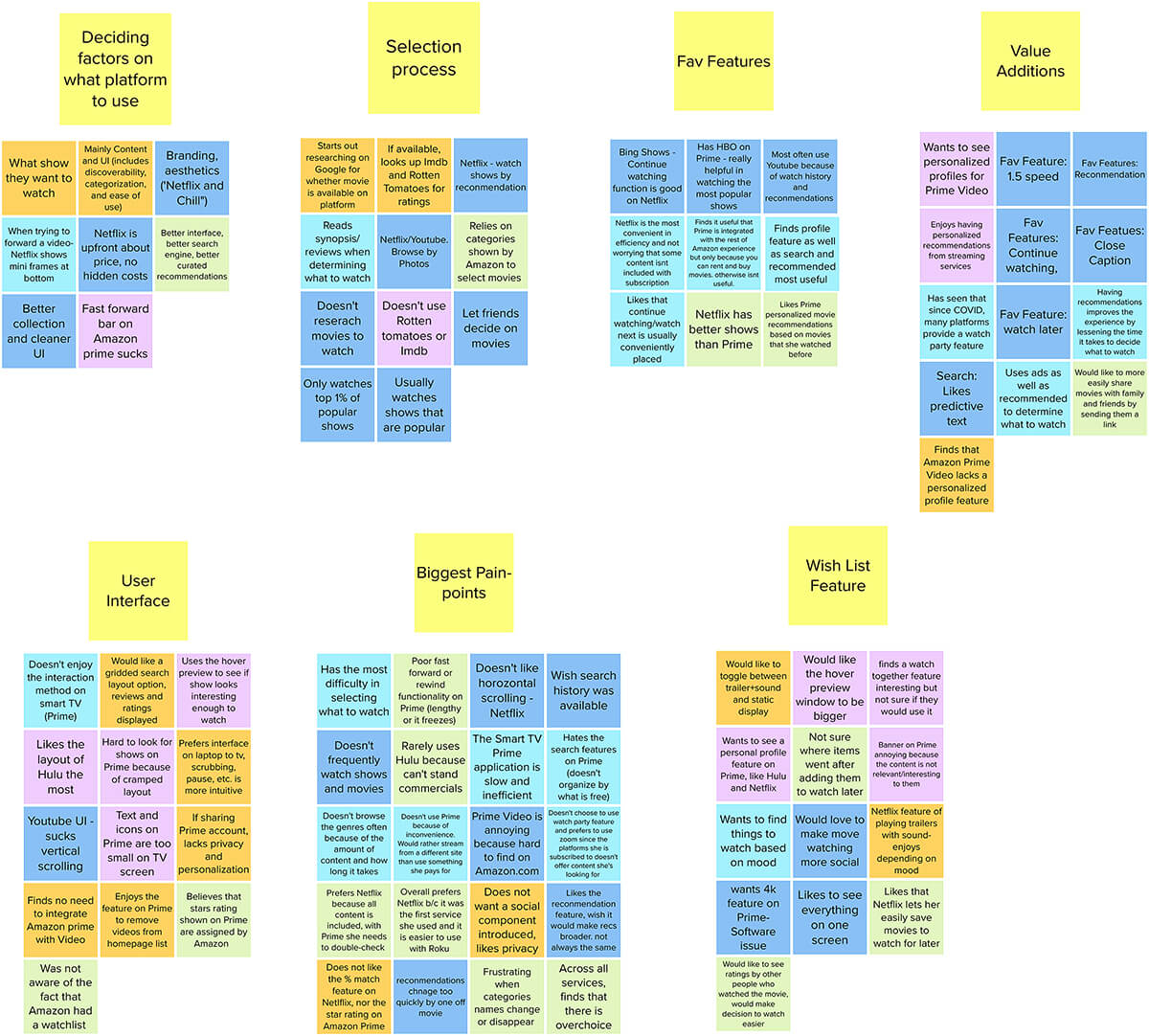
  • Prime Video lives inside the larger Amazon Prime marketplace, creating constant usability collisions.
  • The site is error-prone when users are trying to find free content only.
  • Inconsistent terminology across cards and navigation makes the UI feel unfamiliar.
  • Accelerators that offer flexibility and efficiency are either non-existent or unoptimized for streaming.
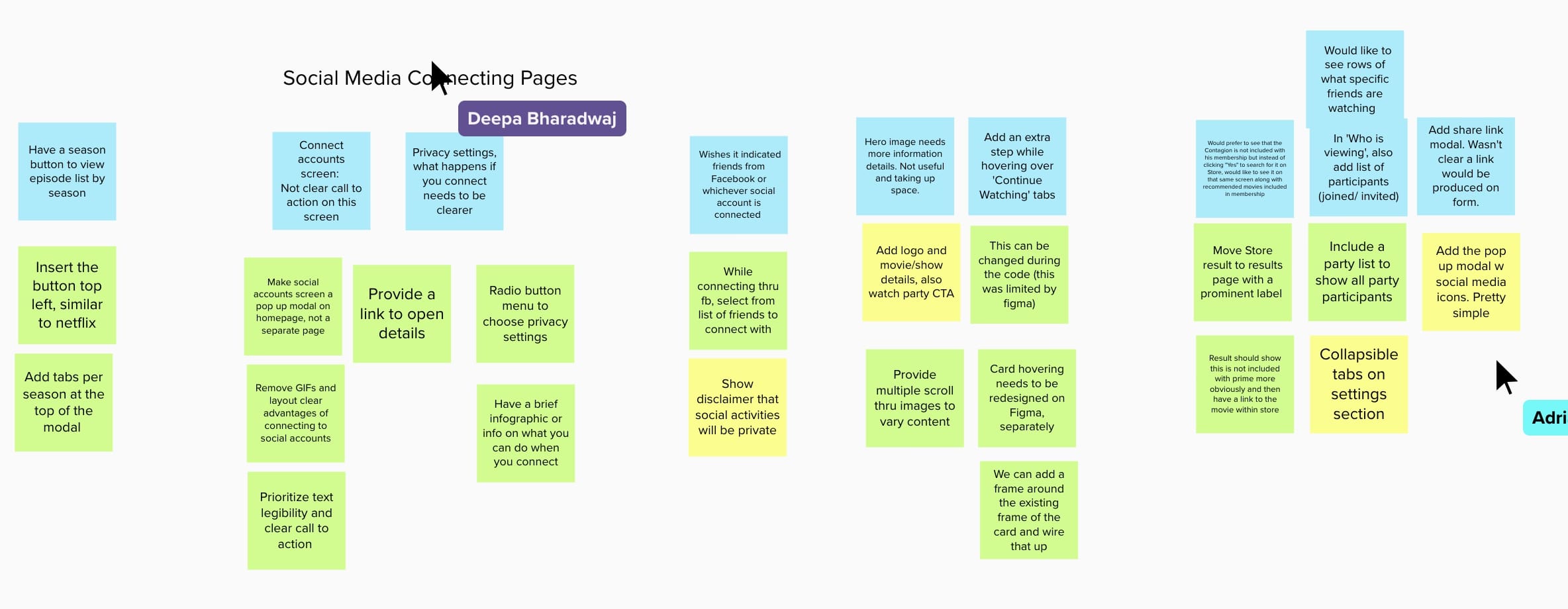
Affinity diagram from user interviews [ FIG.02 · Affinity diagram ]
Affinity mapping of 5 user interviews Sorted into pain-point clusters

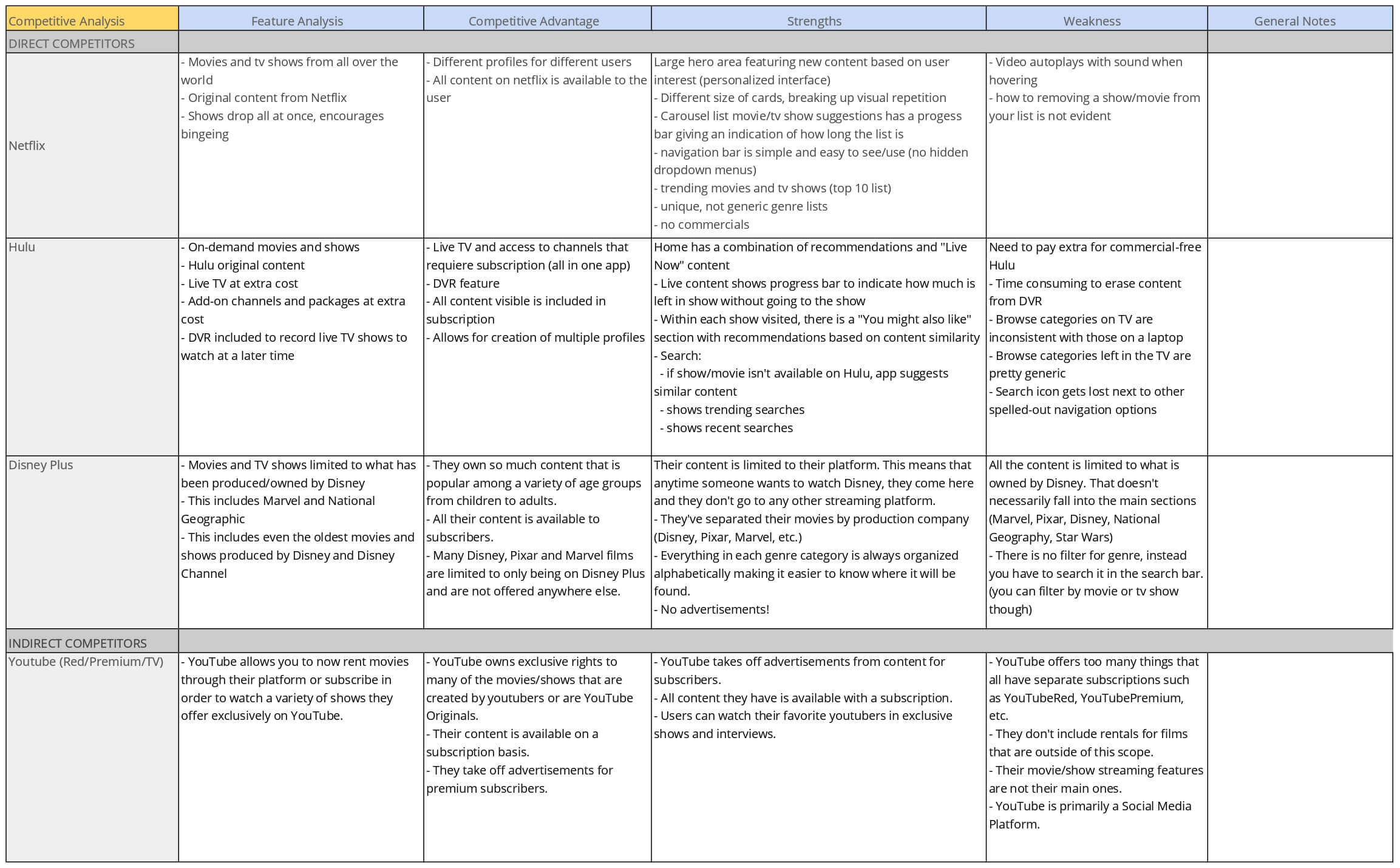
Competitive landscape

To benchmark, we evaluated three direct competitors (Hulu, Netflix, Disney+) and one indirect (YouTube). The common strengths Prime Video was missing:

  • Welcoming homepage with personalized suggestions and profiles.
  • Carousels with visual rhythm and progress bars for live content.
  • Objective recommendations based on watch history.
  • Display of trending searches and popular content; alphabetical genre sorting.
Competitor analysis grid [ FIG.03 · Competitor analysis ]
Hulu · Netflix · Disney+ · YouTube FIG.03

75% of users preferred competitors over Prime Video.


03 · Definition

Meet Katrina.

With a sharper picture of the behavioral and cognitive patterns of potential users, we built a primary persona, journey map, and storyboard to anchor every downstream decision.

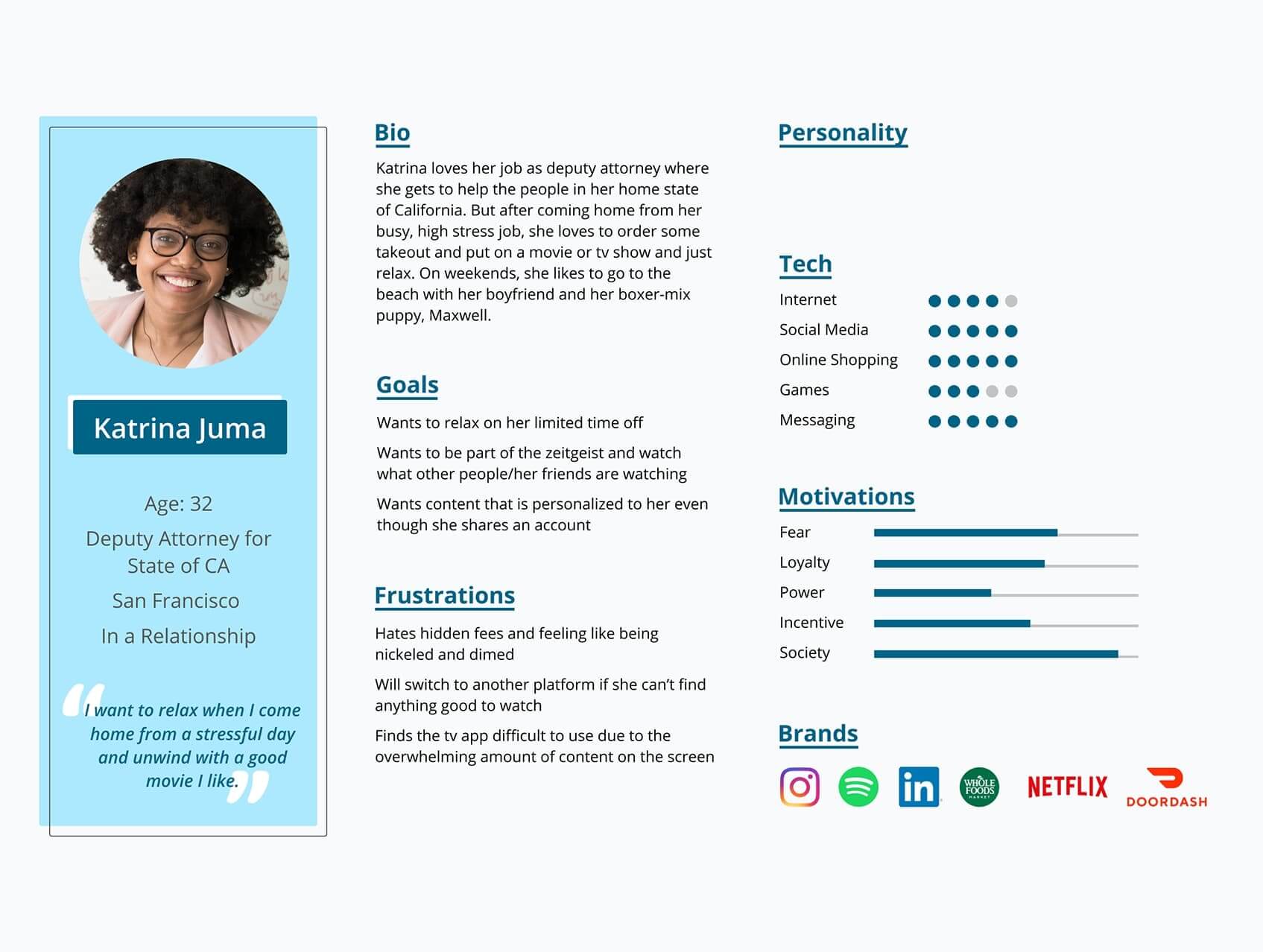
User persona — Katrina
Persona · 01

Katrina Juma

Active Prime member, 22–38, watches socially. Frustrated by clutter and lack of personalization.

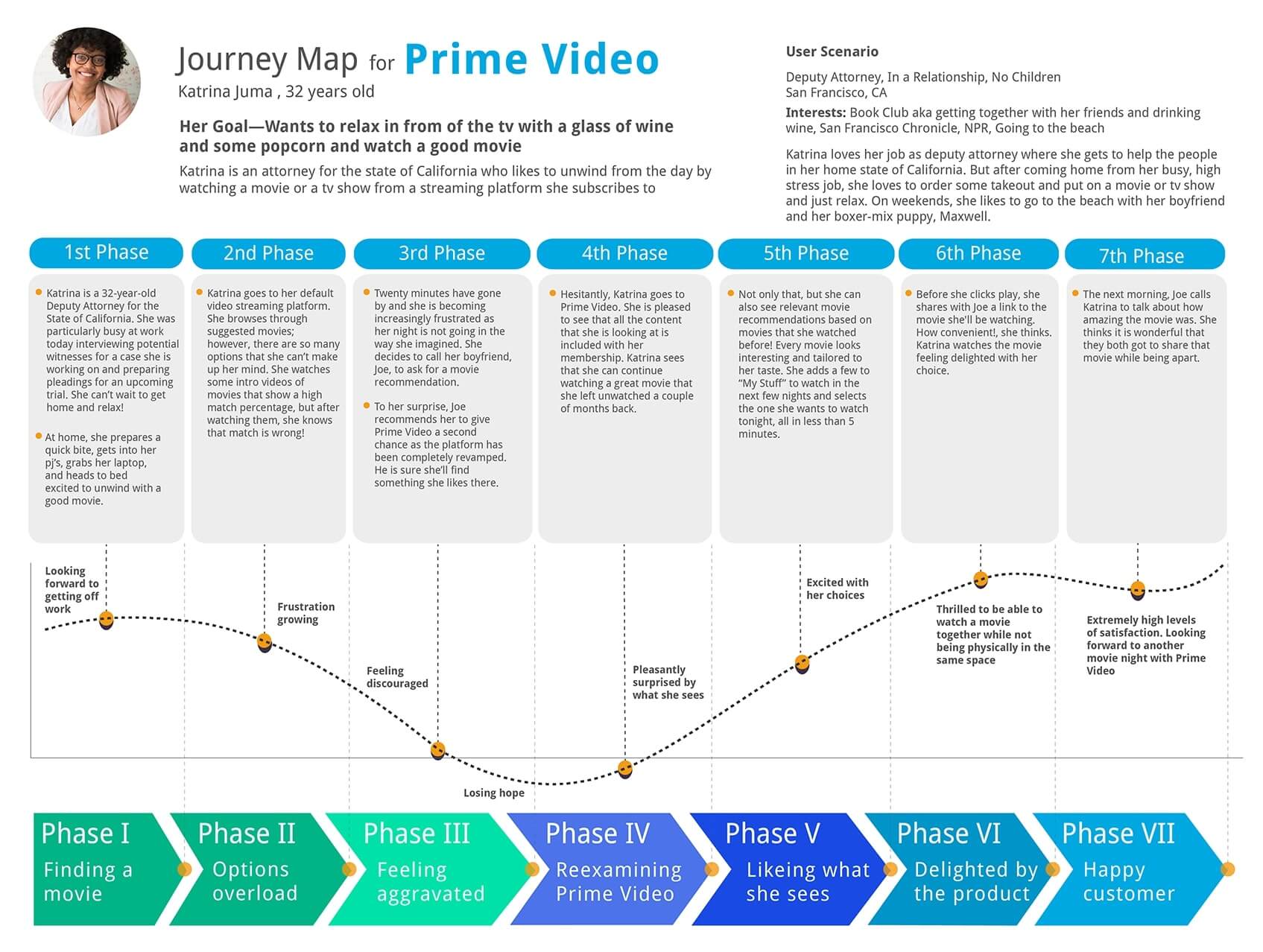
User journey map
Journey Map · 02

Find & watch

Mapped Katrina's path through the redesigned site — from sign-in to a Watch Party.

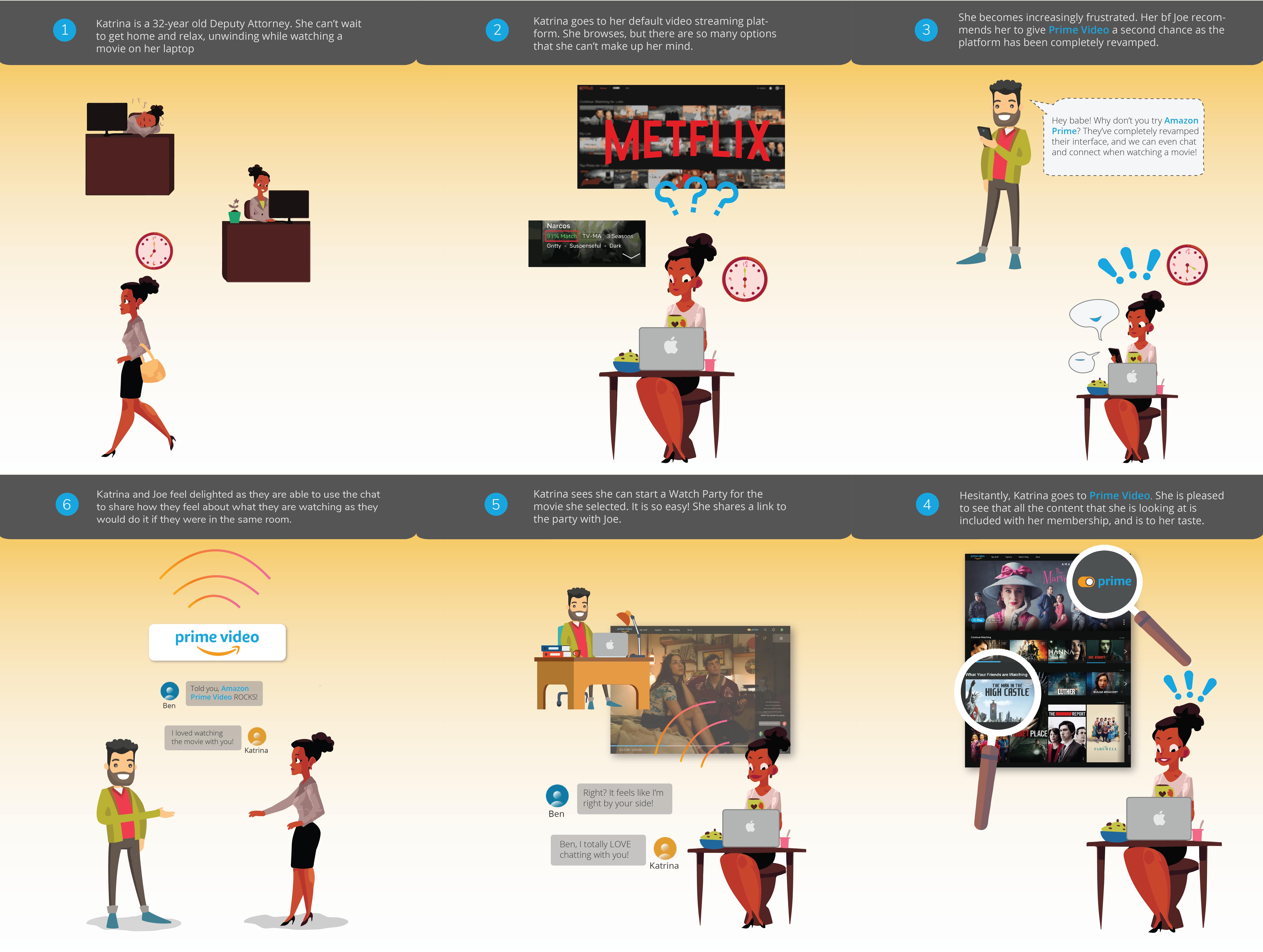
Storyboard
Storyboard · 03

Saturday night in

Scenario: Katrina opens her favorite streaming platform, picks a film, and invites her sister to a Watch Party — all in two clicks.

[ How might we ]

How might we help users feel familiar with Prime Video — and delighted to use it — so it becomes their default video streaming platform?


04 · Redesign Goals

Six objectives. No compromise.

From research and persona work, the team committed to six redesign goals — written tightly so we could check every screen against them.

→ 01

Detach from the marketplace

Decouple Prime Video from the broader Amazon Prime UI for a cleaner, streaming-native experience.

→ 02

Connect with friends

Allow integration of social accounts and improve the Watch Party experience to actually connect viewers.

→ 03

Personalize the homepage

Add profiles, content suggestions, and recommendations from social-media contacts.

→ 04

Free vs. paid clarity

Give users an unambiguous mechanism to distinguish what is included with Prime from what is not.

→ 05

Streaming-first search

Build a dedicated Prime Video search that integrates with the store so users always find what they need.

→ 06

Trustworthy ratings

Replace the marketplace ratings with IMDb scores — a source users already trust.


05 · Ideation

Mapping the flows.

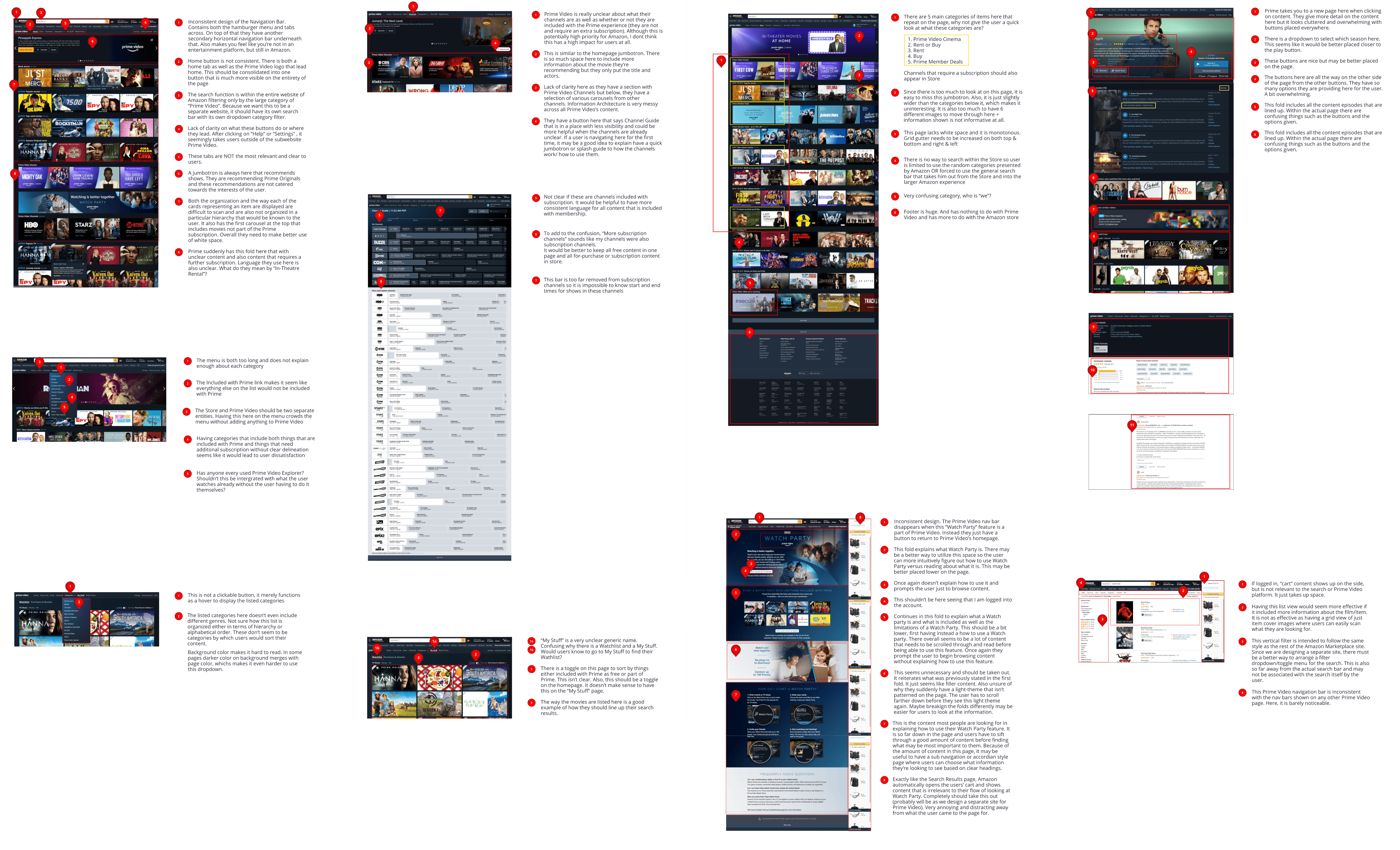
We began with a page-by-page heuristic analysis of Prime Video — homepage, show/movie detail, search, store, and the Watch Party page that users had flagged as most desirable.

Heuristic analysis grid [ FIG.04 · Heuristic analysis ]
Page-by-page audit of usability issues FIG.04

User flows

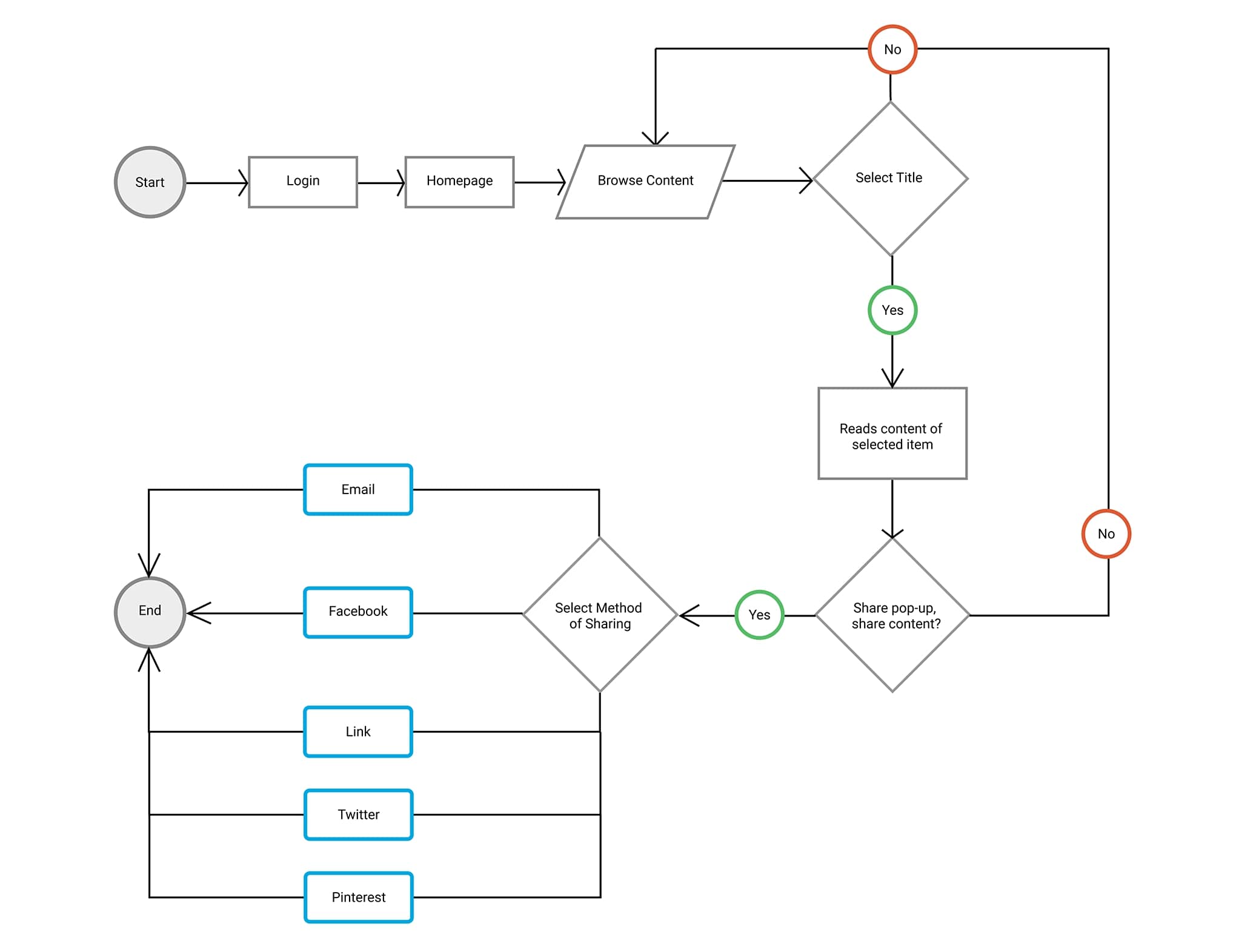
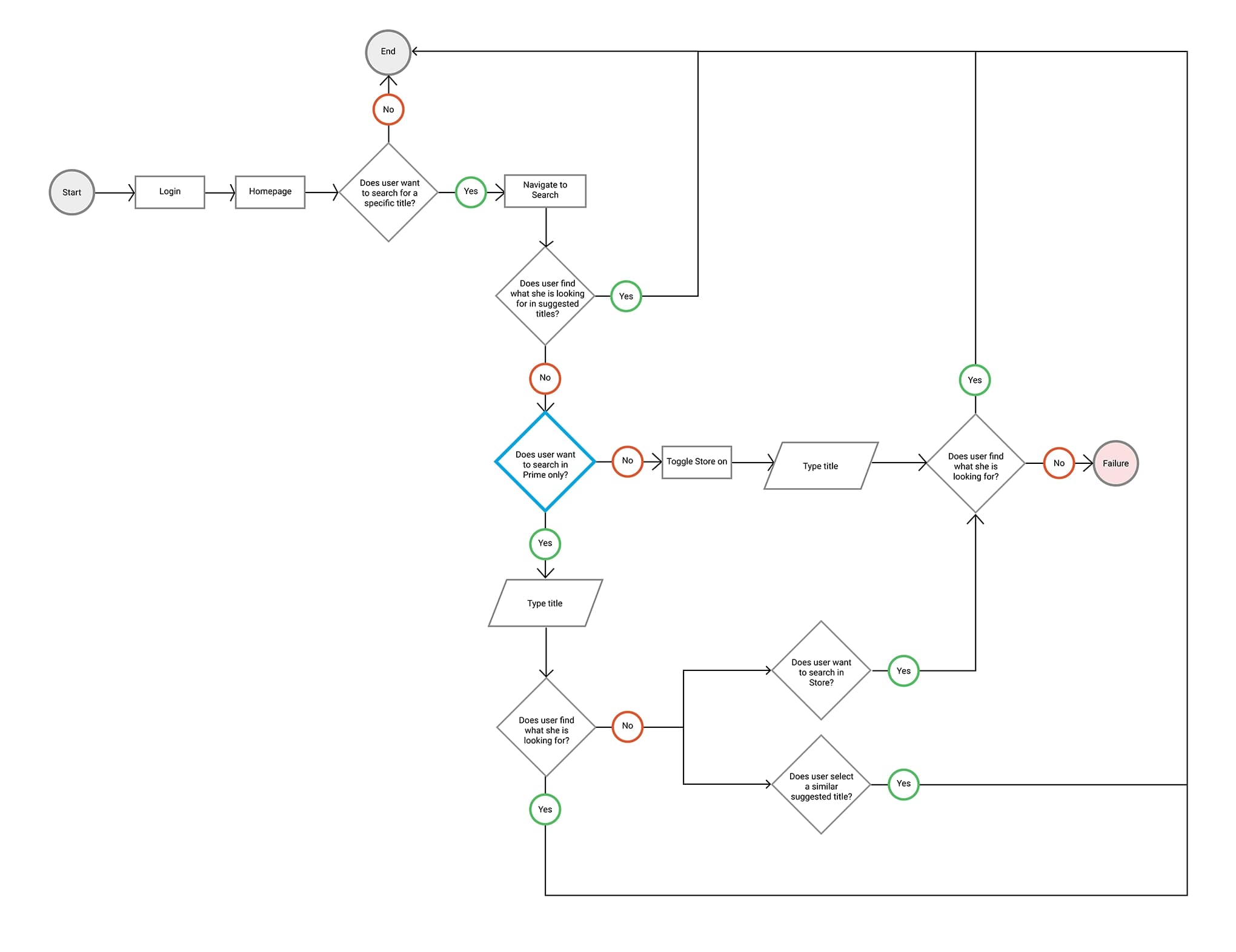
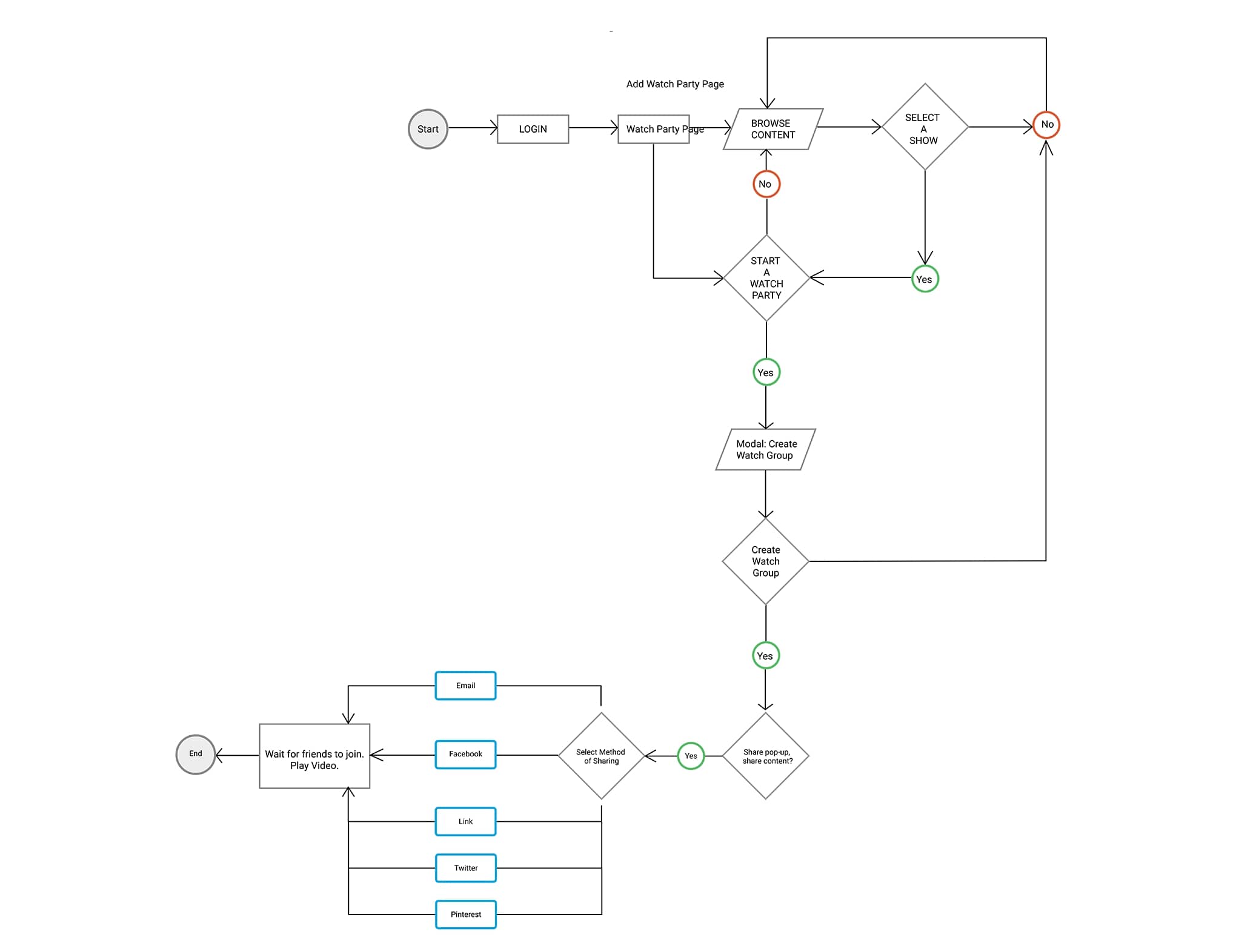
Given the ambitious goals, we mapped flows for the high-stakes paths so we could test each one independently:

  • Login and connect to social accounts
  • Browse content on the homepage
  • Search for content
  • Explore the Store
  • Create and start a Watch Party
Share content user flow Share content
Share to social user flowFIG.05
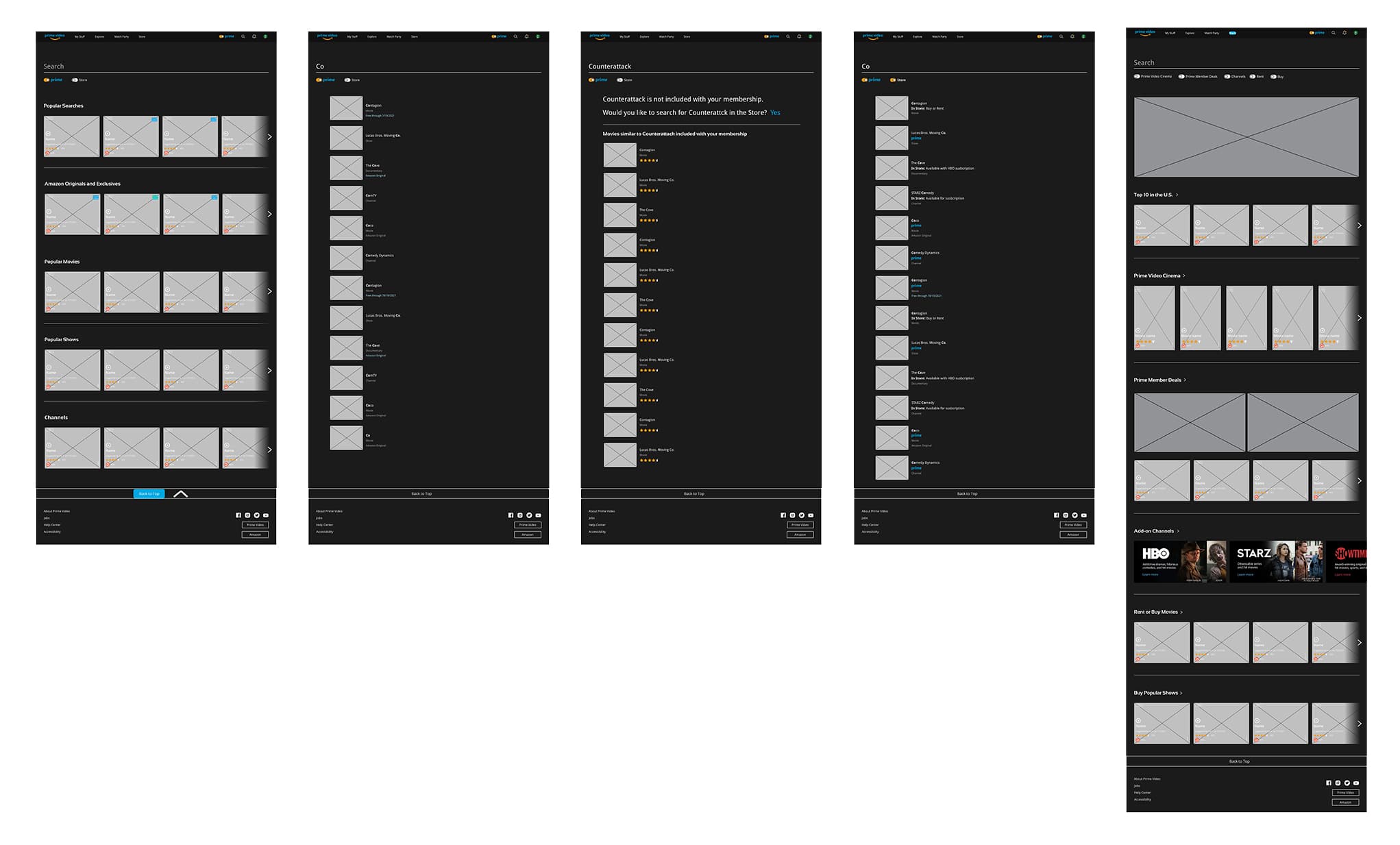
Search user flow Search
Redesigned search flowFIG.06
Watch Party user flow Watch Party
Create & join a Watch PartyFIG.07
Search and store flow Search + Store
Native streaming search bridged to storeFIG.08

Information architecture

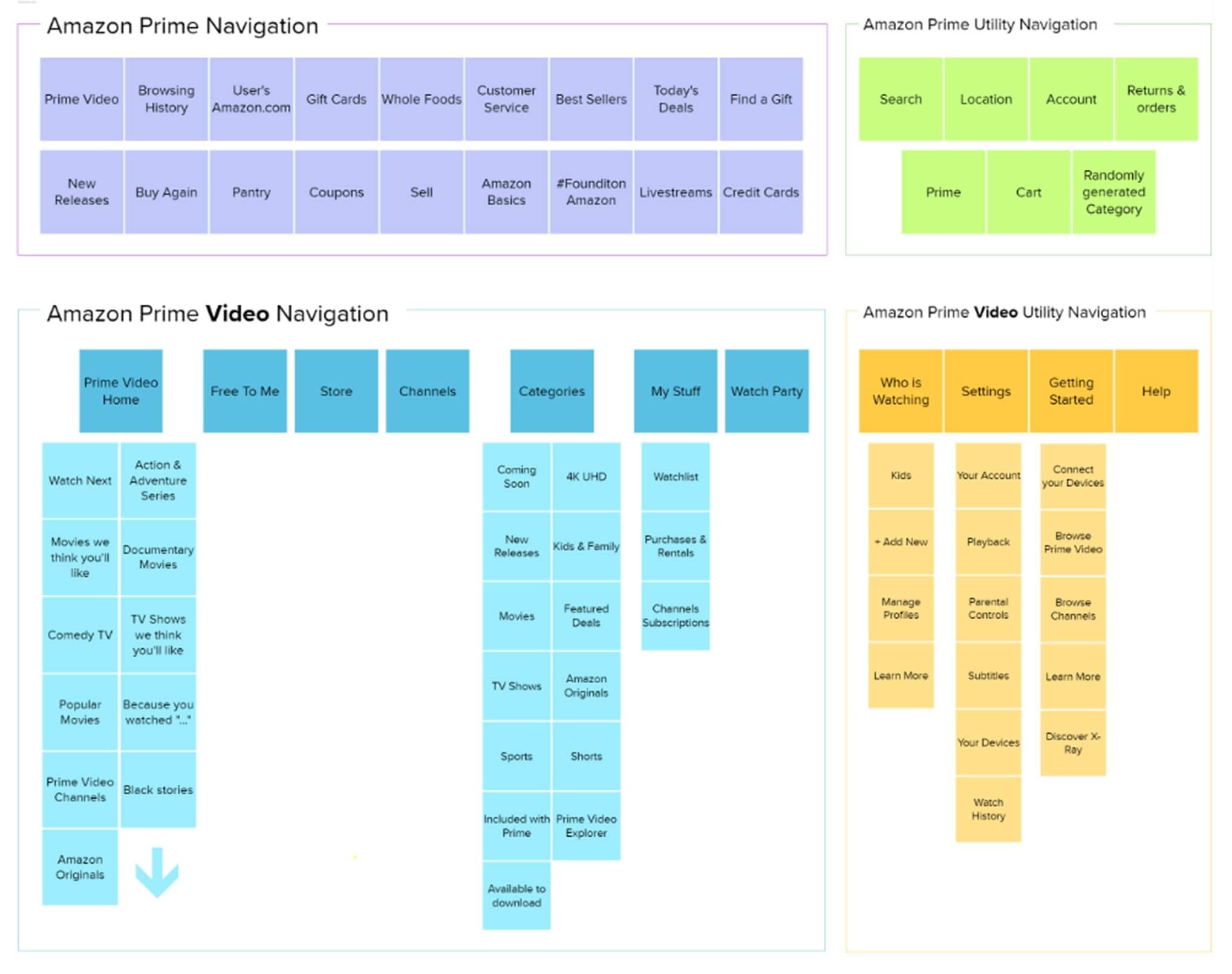
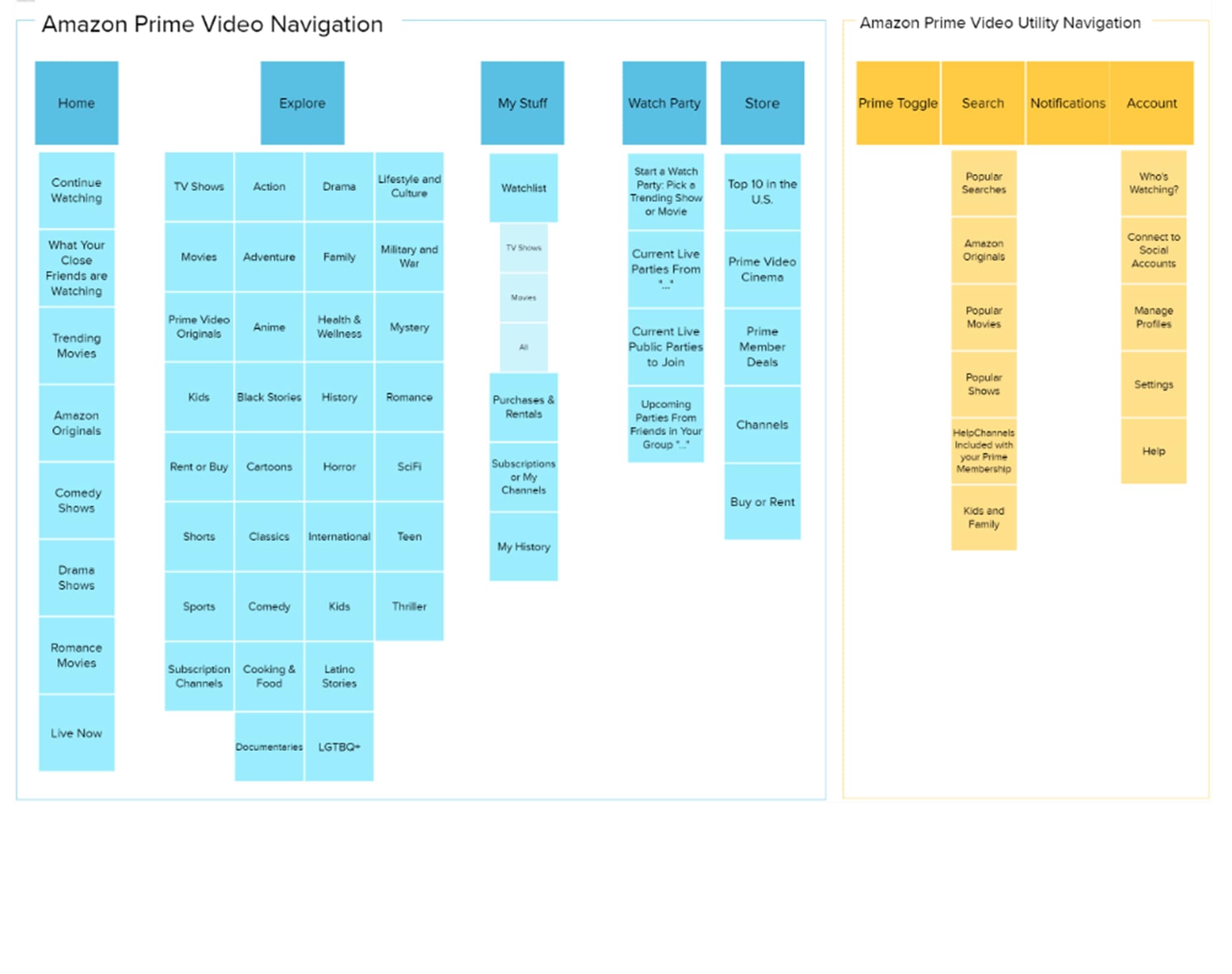
One of the site's loudest issues was the display of irrelevant information. We ran a card-sorting exercise to redefine the IA — the redesigned sitemap is dramatically more streamlined and intuitive than the original.

Original sitemap Before
Original IACluttered
Redesigned sitemap After
Redesigned IAStreamlined

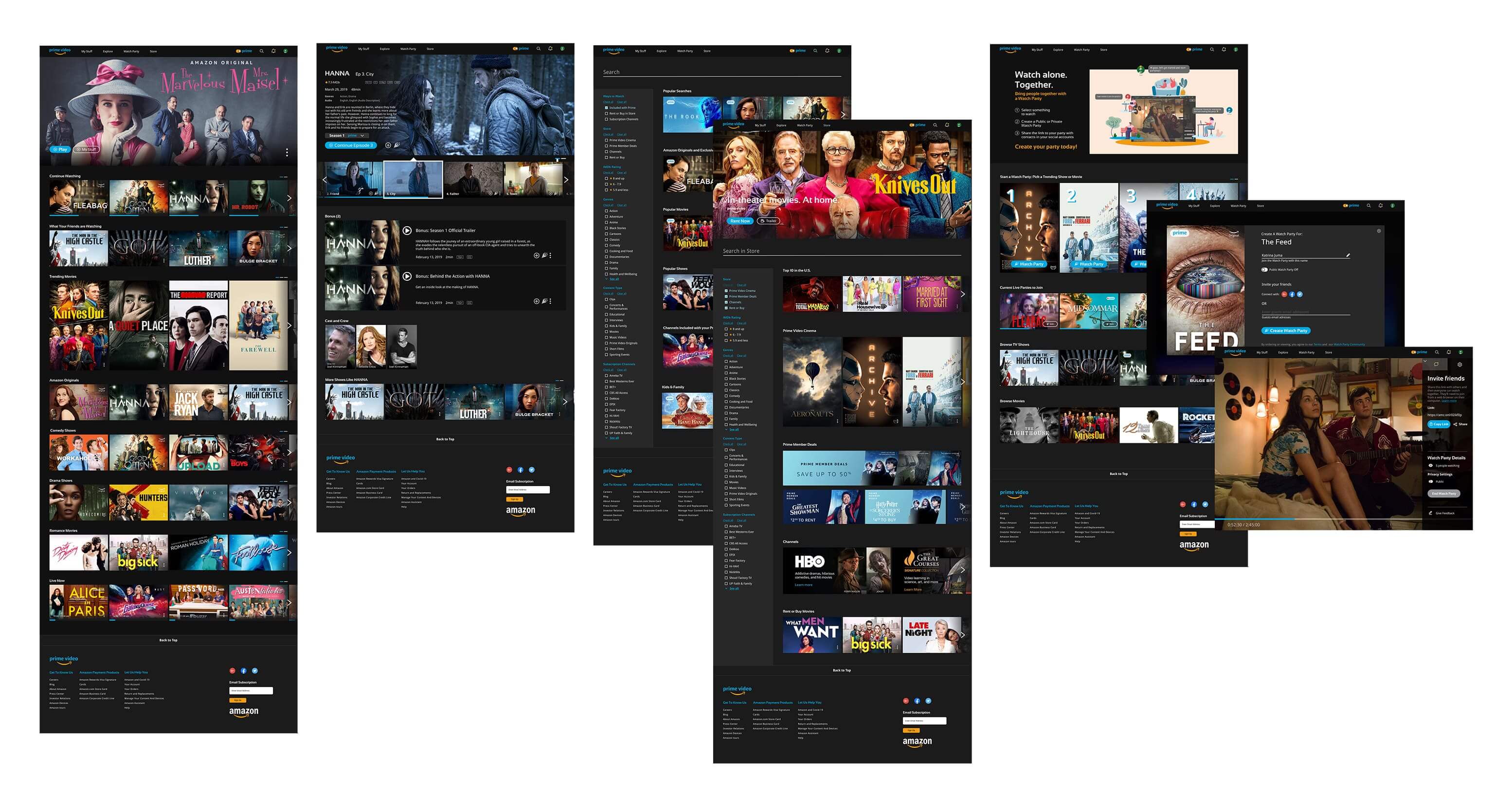
Wireframes & visual system

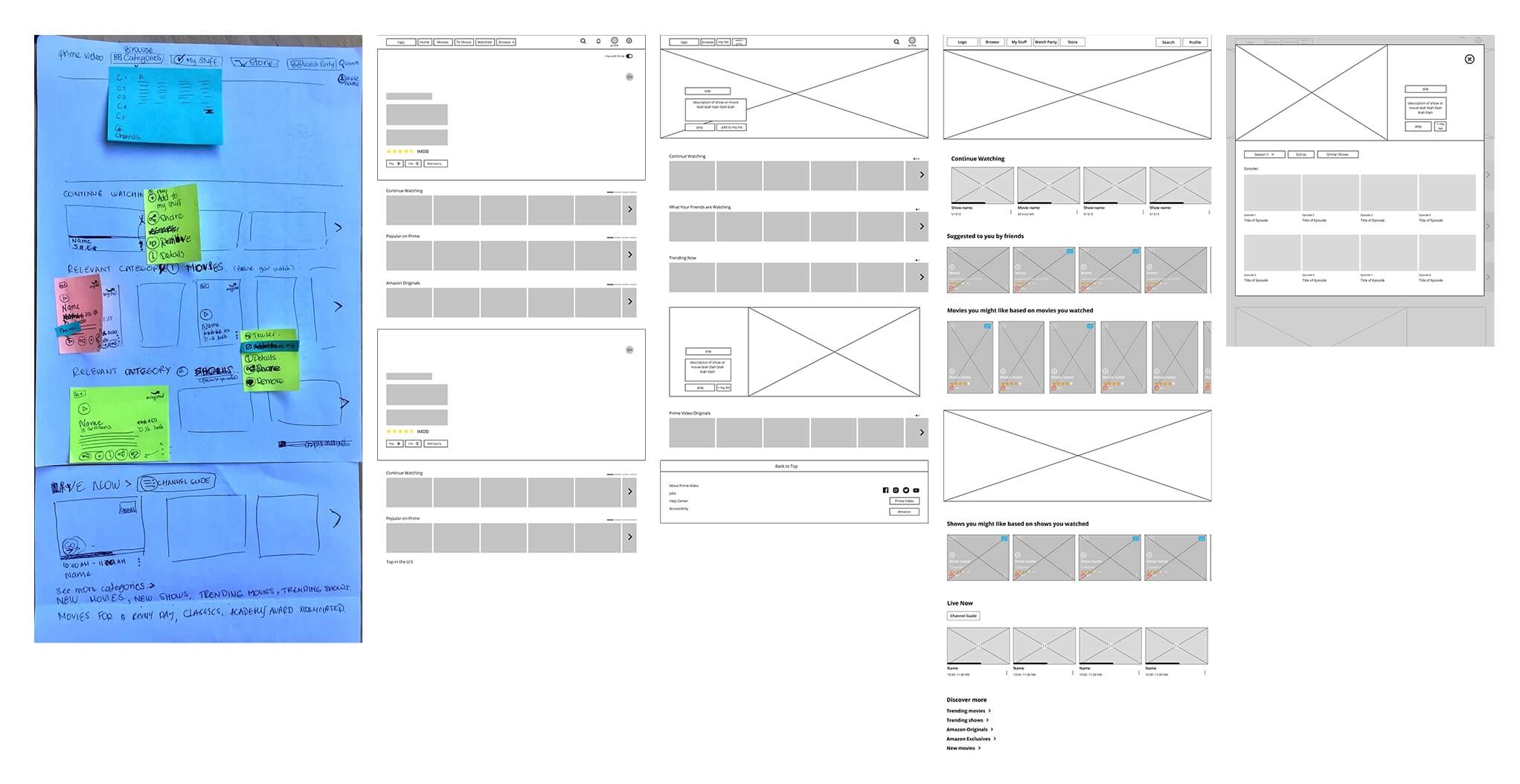
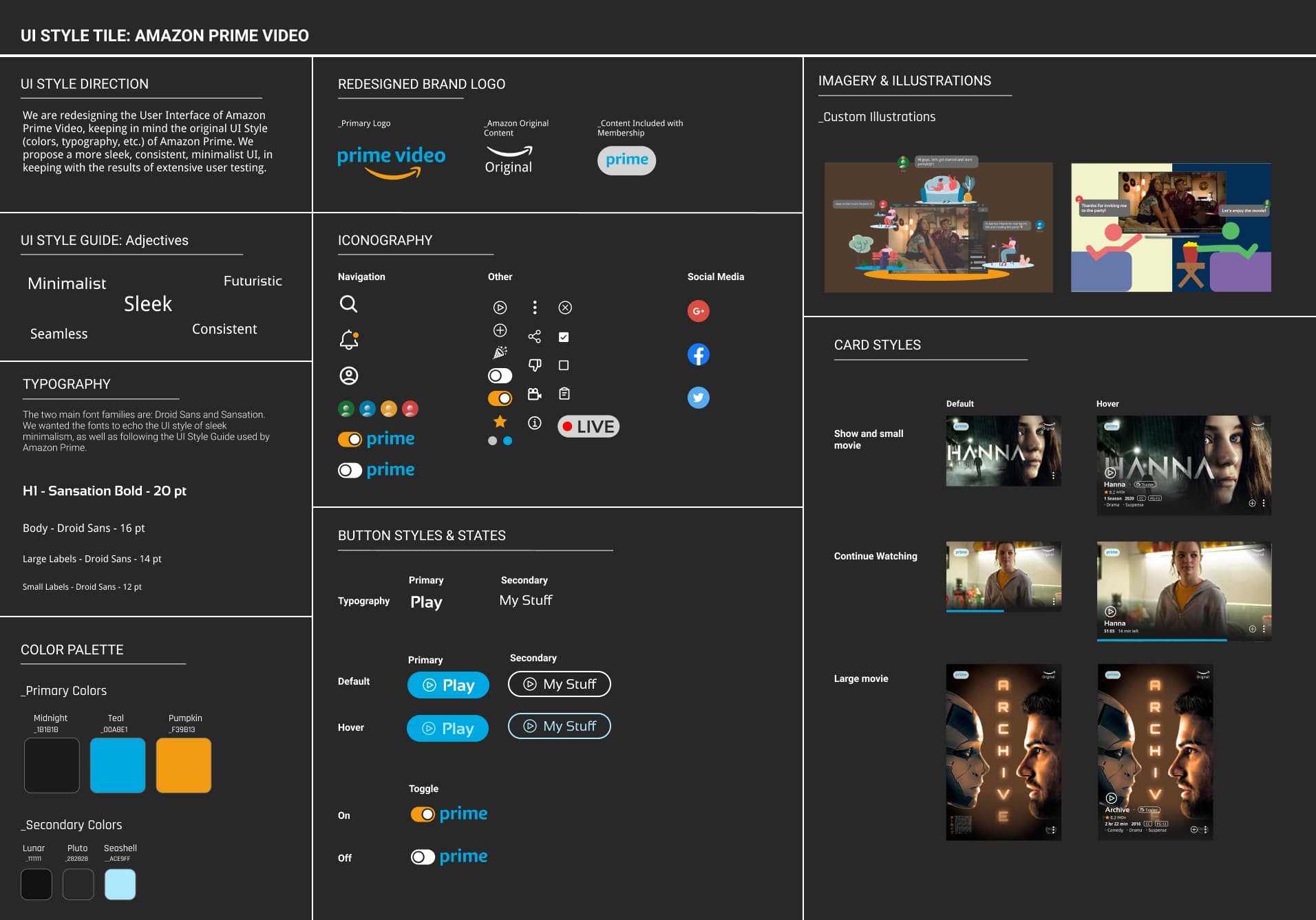
From there: low-fi wireframes to lay out user-preferred content and to ideate iconography and interactions. Then a style tile referencing Amazon Prime's existing UI guide so the redesign felt familiar — not foreign.

I led the UI redesign objectives and visual style consolidation, and built out a UI component library — atom elements first (text, color, icon components), then nested compounds. Consistent naming made instance swapping painless across the team.
Low-fidelity wireframes Lo-fi
WireframesFIG.09
Style tile Style tile
Visual system anchored to PV's UIFIG.10

06 · Usability Testing

What testing taught us.

We tested four flows: log in & connect to Facebook · browse the homepage with the Prime Toggle · search a specific movie · create a Watch Party and chat with friends.

Usability testing session [ Usability testing ]
4 flows tested with target users FIG.11

Insights

  • Users skipped through onboarding screens explaining the purpose of social-account integration.
  • Wording and form design on the Watch Party screens were confusing — many users didn't fully grasp what a Watch Party entailed.

Improvements

  • Simplified the onboarding while still surfacing the benefits of connecting social accounts.
  • Clarified the Watch Party concept with sharper wording and a tighter form design.

07 · Redesign Comparison

Page by page.

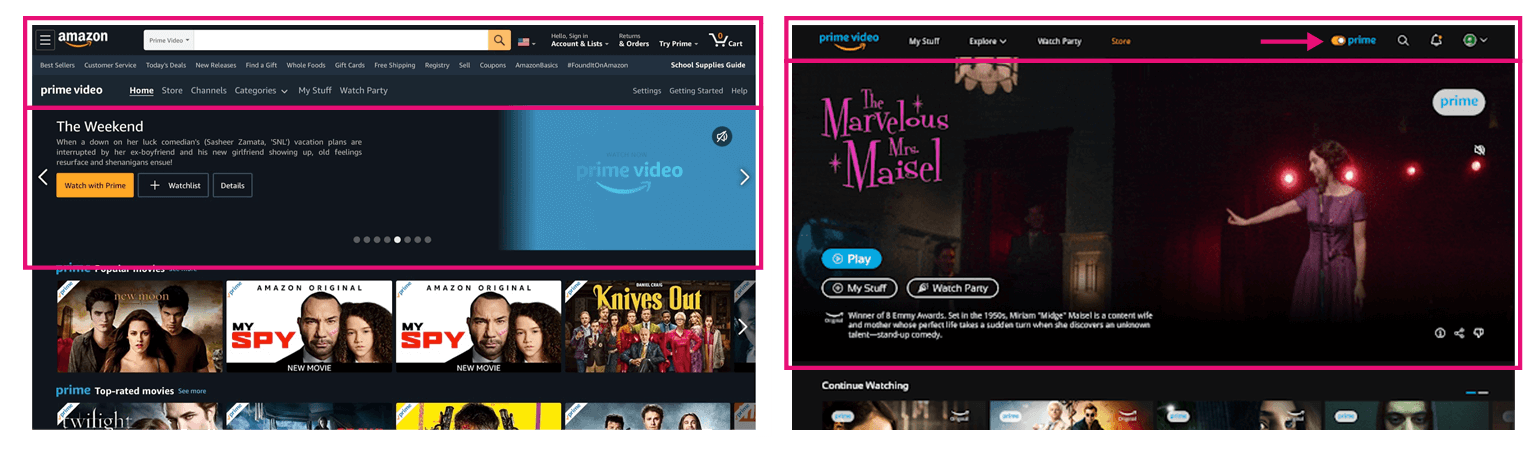
01 · HomepageStreaming-first nav

We separated Prime Video from the shopping site, simplifying the navigation to only what's needed for streaming. Because lack of cost transparency was a recurring frustration, we added a Prime Toggle — flip it on to see only what's included with Prime.

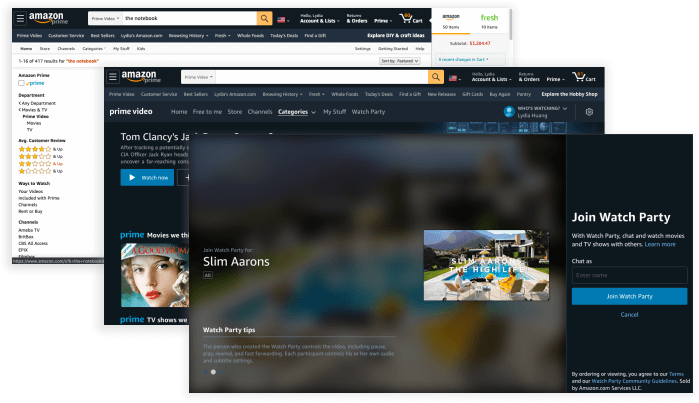
Original Prime Video homepageBefore
Redesigned homepageAfter
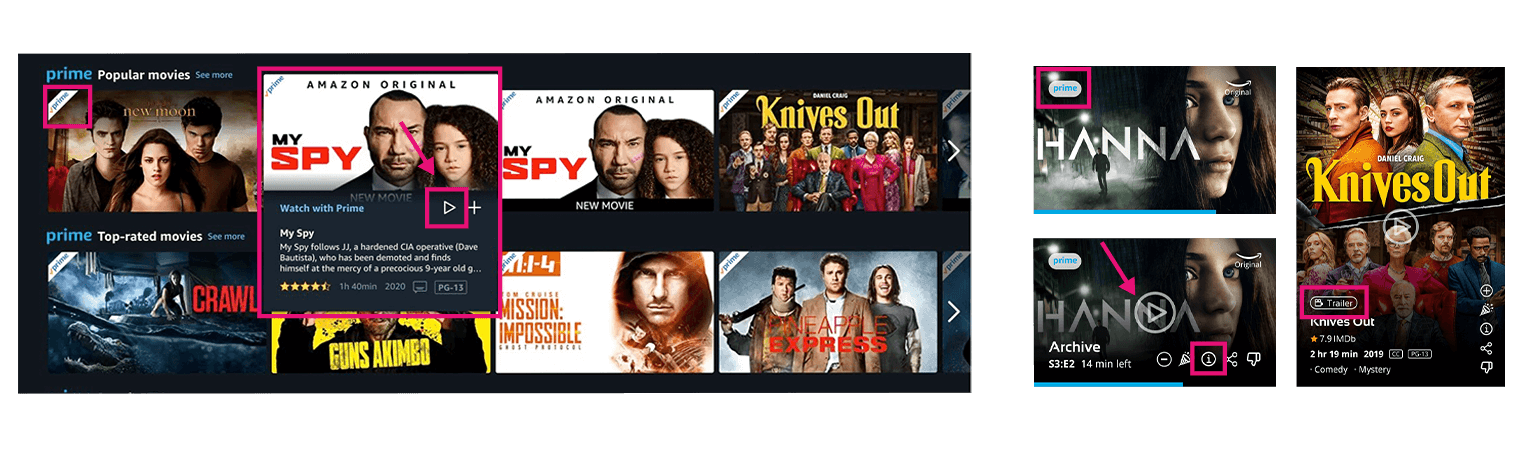
02 · CardsThe card is the play button

The original Prime tag was a banner; we replaced it with a softer geometric oval. The hover card became its own play button — clicking the image starts content. An info icon opens a pop-up modal with content details, and a separate trailer button lets users explore without committing.

Redesigned hover cardRedesigned card
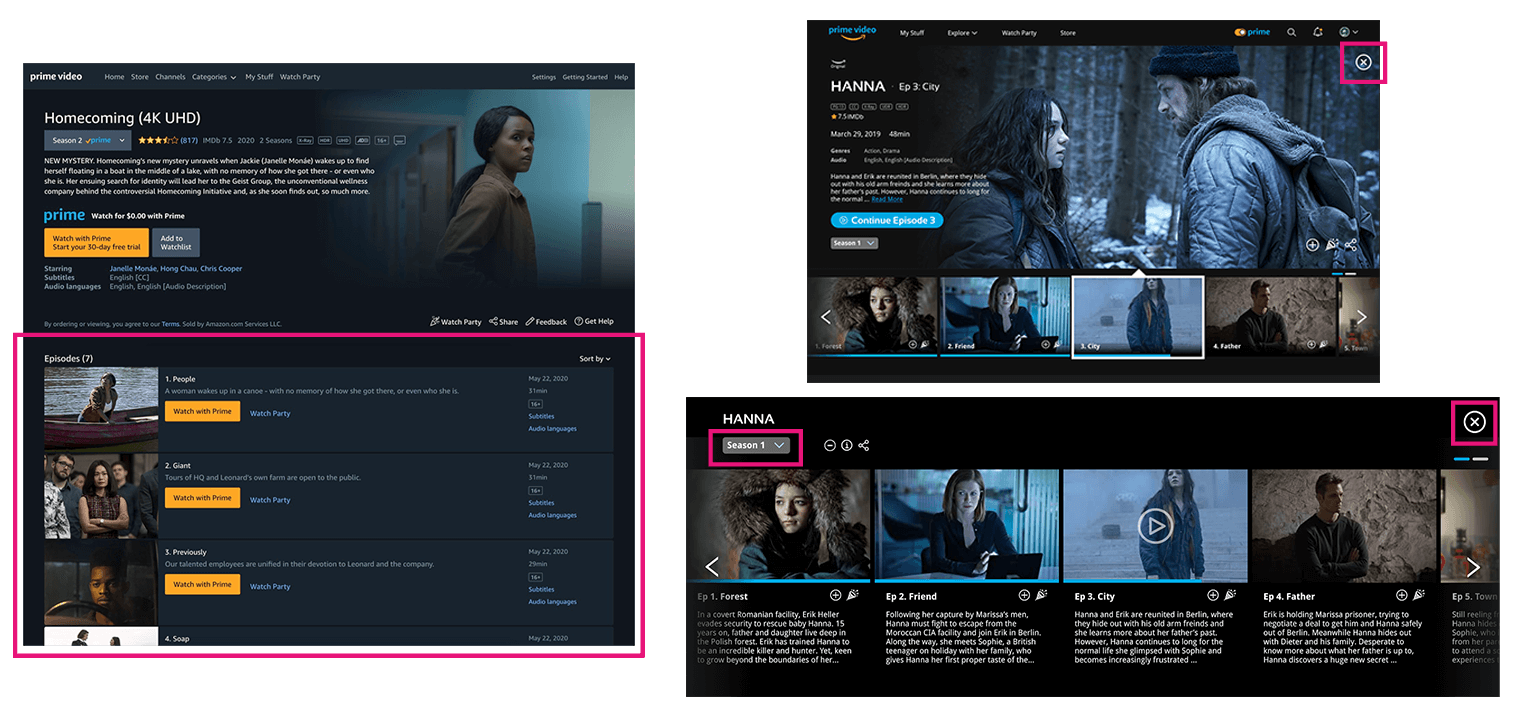
03 · Details modalStay on the homepage

The original details view was a separate page — you lost your place every time you clicked. We replaced it with an expanding modal that keeps you on the homepage. Additional episodes scroll horizontally instead of vertically, cutting down the up-and-down rhythm of the original.

Details modalDetail modal
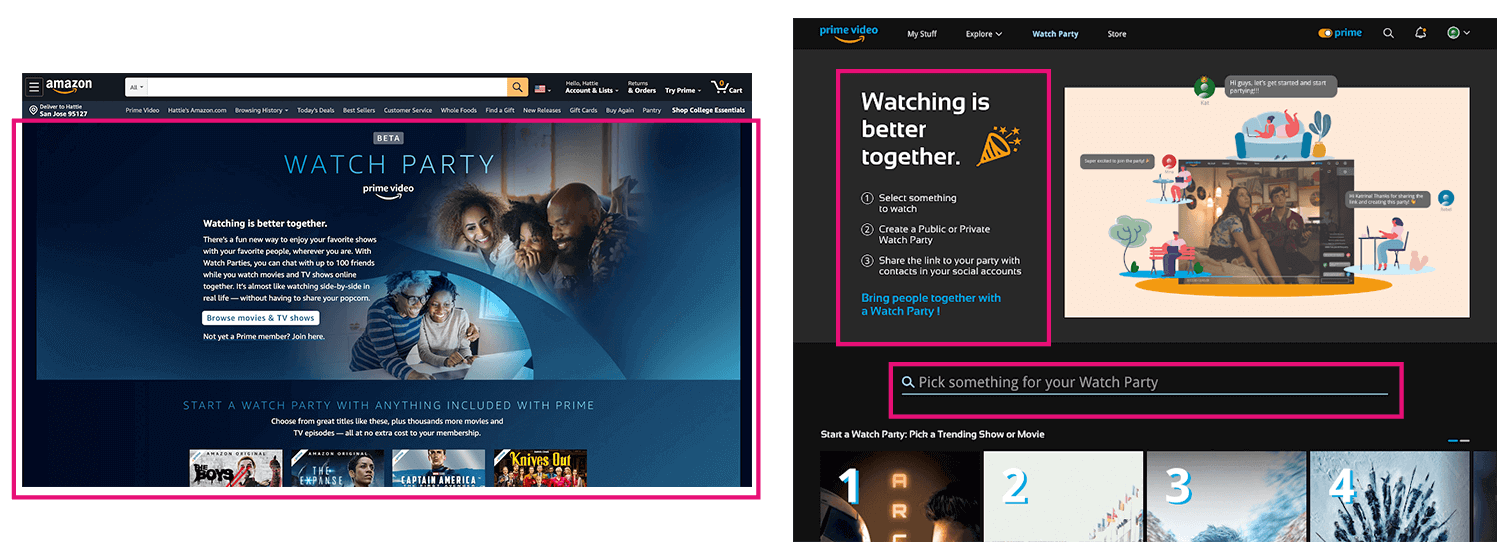
04 · Watch PartyThree steps, not three paragraphs

The original Watch Party landing was a wall of instructions. We rewrote it as three short bullets and built creating one to be intuitive. A search bar lives directly on the Watch Party page so finding something to watch feels native to the feature.

Redesigned Watch Party page3-step setup
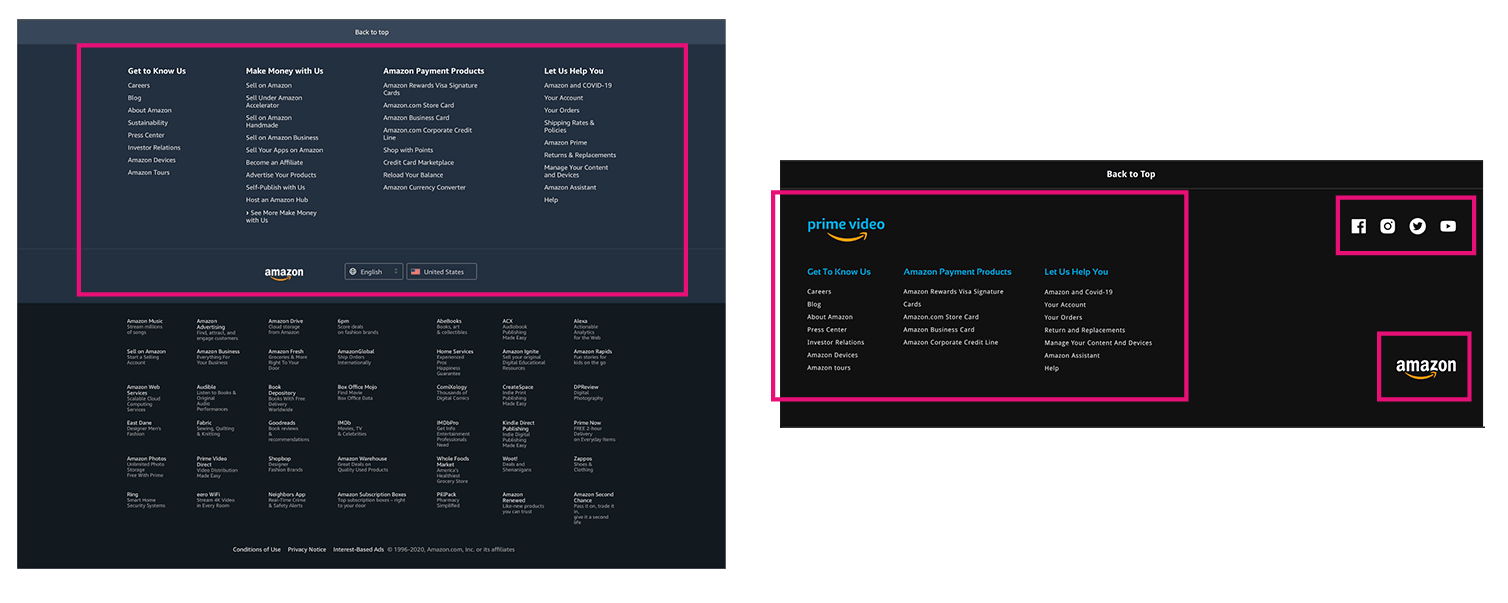
05 · FooterShed the marketplace

The original footer dragged in every Amazon subdivision — Prime Video, Amazon Fresh, Sell on Amazon — into one bloated block. We trimmed it to only what's relevant to the streaming platform.

Redesigned footerStreamlined footer

08 · Hi-Fi Prototype

The thing in motion.

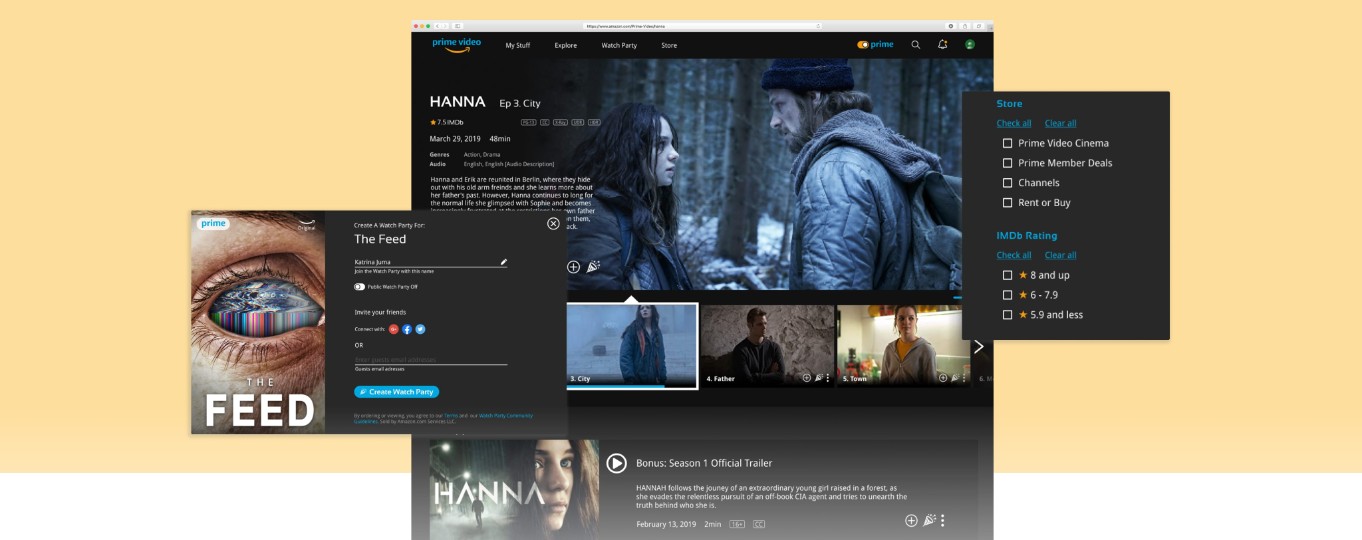
We addressed the minor visual issues surfaced in usability testing and built a final hi-fi prototype — including a sharper way to convey the value of integrating Prime Video with social accounts, since that was central to the value proposition.

Final prototype walkthrough
Open interactive prototype
Hi-fi mocks composite [ Hi-fi composite ]
Final hi-fidelity screens FIG.12

09 · Results

What shifted.

01
90%
of testers preferred the redesigned interface over the original Prime Video
Hi-fi testing · 10 users
02
100%
success rate on the redesigned Prime Toggle feature
Task completion
03
2×
core threads to keep exploring: deeper filter integration on the homepage, and stronger social-account connectivity
Next horizons

What's next

  • Integration of filters — explore filters directly on the homepage to personalize further (language, subtitles, duration, rating).
  • Reinforce the social media component — keep exploring social integration while protecting privacy and giving users full control over what they share and with whom.

Keep reading.

[ Related Work · 03 ]
[ Get in touch ]

Want the full
walkthrough?